

 Optimizely



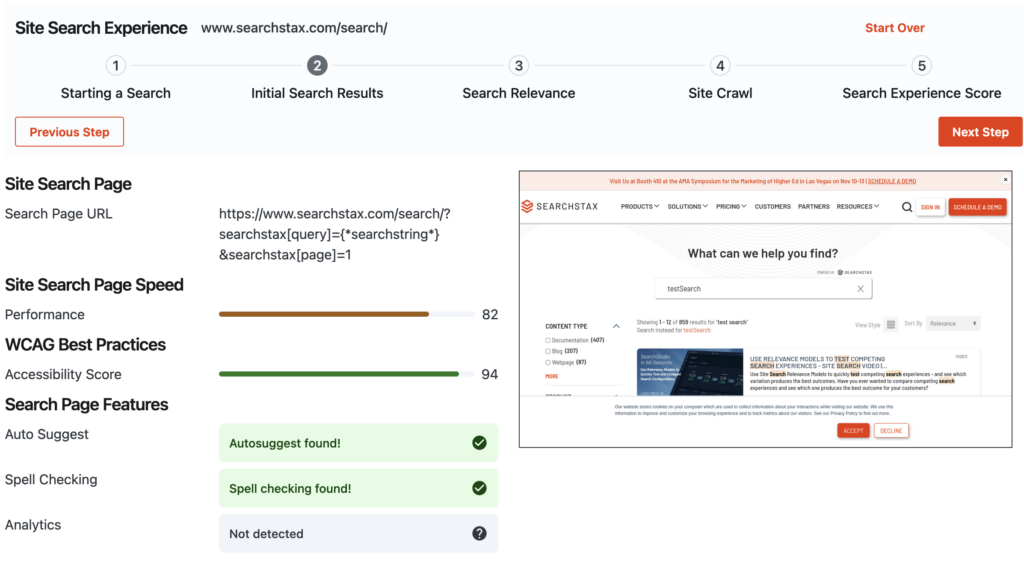
The Search Experience Test helps Site Search customers QA their search experience automatically.
Search Experience – How to Automate your Site Search Testing & QA
Testing and QA have become an integral part of website deployment and lifecycle development. While testing can’t cover every line of code or use case – well-designed testing infrastructure and effective quality assurance can uncover defects and ensure that your site experience remains consistent when deploying new features and updates.
Typically testing tools and suites, QA runbooks, and other testing methodologies have focused on easily reproducible tasks and steps that have predictable outputs. So how do you test open ended dynamic features like site search that might return different results every week? What about testing for qualitative metrics like search relevance or effectiveness?
What Makes a Good Site Search Experience (that can be tested)?
Effective site search is typically a combination of search features and enhancements (such as autosuggest, related searches, and facets) and the relevance of search results for a user’s search query as well as how easily site visitors can find and interact with your site search features.
Search features and enhancements can typically be tested and interacted with using common testing processes such as Selenium or Puppeteer browser tests or testing suites built into your development tooling (such as Jest for React apps). Other tools such as Google Lighthouse and axe can be used for site performance and accessibility testing.
Search relevance can be more difficult to consistently test – especially as your site content grows and search results improve. Some methods include checking for specific results or keywords to appear for a given term – but these manual pass/fail testing procedures require additional time and effort to maintain. Other methods such as MRR (mean reciprocal rank) or other behavioral data-based measurements rely on analyzing user behavior over time and can’t proactively predict how new content or changes will impact relevancy or search quality.
Let’s take a look at options for analyzing site search features and creating effective software tests and QA tasks to ensure your site search experience continues to be effective for your users.
Testing your Search Experience using Browser-Based Testing
Unit tests and component testing are a critical part of web development but these types of tests alone cannot fully reproduce and capture how your users actually find, interact with, and move through your website. Testing suites like Selenium, Playwright, and Puppeteer can be better for testing purposes since they emulate an actual user interacting with a browser and can be easily scripted for complex reproducible testing.
[This example will include code examples for running tests via Selenium and Python – see the Search-Experience-Test repo for a Docker-based search testing kit]
Browser-based testing does have drawbacks. In addition to the framework setup and test configuration you may encounter rendering and interaction difficulties when trying to find, click, or interact with specific page elements. Nonetheless they offer a reproducible testing environment that can test your site in as close to real world conditions without using actual people.
					from selenium import webdriver
from selenium.webdriver.chrome.service import Service

driver = webdriver.Chrome(service = Service( ChromeDriverManager().install()) )

driver.set_window_position(0, 0)
driver.set_window_size(1400, 900)

driver.get("https://site-dev.searchstax.com")
driver.implicitly_wait(10)
Testing Website Discovery – Can Users Find your Site?
While not a purely-technical test – checking how ‘discoverable’ your website is can uncover underlying technical issues that might be impacting your site’s UX as well as visibility on web search engines such as Bing and Google.
Google’s Lighthouse testing tool provides high-level summaries of a site’s performance, general WCAG-based accessibility, and an SEO optimization score. Site visitors are more likely to engage with a fast-loading site and navigate deeper into a site’s content and features. Following search engine optimization best practices can certainly help attract more visitors via organic search from Bing, Google, and other search engines. These same optimization can also improve the quality of your site search when using descriptive meta data, logical content strategy, and other enhancements such as images and video.
Lastly WCAG accessibility enables all website visitors to be able to navigate your site, access content, and interact with site features. While not directly related to search relevance – following accessibility guidelines will ensure that your search experience (including UI, descriptive results, and other navigable search enhancements) is consistent with the rest of your site.
					from lighthouse import LighthouseRunner

loadMetrics = [
 	'first-contentful-paint',
    'speed-index',
    'interactive',
]

settings = [
    '--chrome-flags=--no-sandbox --headless --disable-gpu',
    '--onlyCategories=accessibility,performance,seo'
]

lighthouse = LighthouseRunner(
    "https://site-dev.searchstax.com",
    form_factor = 'desktop',
    additional_settings = settings,
    timings = loadMetrics
)

lighthouseScore = lighthouse.report.score
Search Experience – Can a Visitor Start a Search?
Fixed navigation can help users quickly get to the main sections of your site – but many users prefer to jump right to the search bar to find whatever they’re looking for. Many sites utilize global search bars in their navigation as well as larger search interfaces on key landing pages. These search bars aren’t usually difficult to detect and interact with using browser-based tests.
How to test a search bar programmatically
Search bars can come in all shapes and sizes – although they typically have some unique attribute that can be found and tested programmatically. If your search bar has a unique ID or class you can directly target that element – but some search bars might not have a unique or controllable attribute and need to be discovered programmatically.
					# See Seleniun initilization code above
...

for searchInput in driver.find_elements(By.XPATH, "//input"):
if (
searchInput.get_attribute('type') == 'search'
            	or searchInput.get_attribute('aria-label') == 'search'
            	or 'search' in searchInput.get_attribute('placeholder').lower()
        ):
		searchInput.click()
		searchInput.send_keys('test search')
		# break loop or check for more search bars
The code above looks for any inputs on the page and checks to see if their ‘type’ attribute matches ‘search’, the ‘aria-label’ matches ‘search’, or the visible placeholder text contains the word ‘search’. Unfortunately there may be design or technical issues that prevent your browser-based tests from finding or interacting with your search bar if it’s hidden initially or needs some other ‘interaction’ to be visible or enabled.
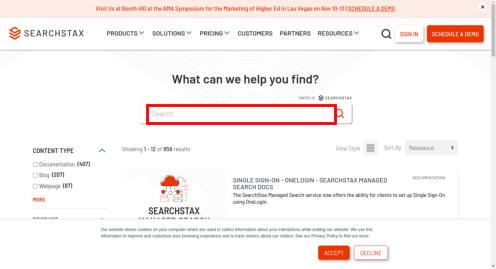
If you can find and interact with your site’s search bar programmatically then you can easily test and QA your site’s search experience, quality, and relevance.
					# Using 'searchInput' found in example above
...

searchInput.clear()
searchInput.send_keys('test search')
searchInput.submit()

WebDriverWait(driver, 10).until(EC.url_changes("https://site-dev.searchstax.com"))
searchPageURL = driver.current_url
The code above clears the search page, enters ‘test search’ and then submits the search. In most cases this loads the actual search page URL so we can set Selenium to wait until the page URL changes and then capture the search page URL for testing purposes. If the search page URL includes the search term you can substitute your testing keywords and request the search page directly.
Testing Search Page Features
Typically component-based testing should effectively cover your search UI elements – but additional browser-based testing can be used to test production data/configs, specific device sizes, and simulated loading delays that real users might encounter. These tests will likely be specific to the search features on your site and will need to utilize contextually-appropriate search queries in order to show or trigger the features for testing.
Autosuggest
Testing autosuggest features can be tricky due to the various ways in which autocomplete can be implemented. Autosuggest typically uses a well-defined input field that can be easily interacted with using browser-based tests. Verifying the actual autosuggest output, however, will likely require customized testing based on your autosuggest implementation.
At the very least you can check for any network activity while entering a search query and analyze the response for testing purposes.
					# Using 'searchInput' found in the example above
...

searchInput.clear()
searchInput.send_keys('t')
time.sleep(0.5)

searchInput.send_keys('e')
time.sleep(0.5)

searchInput.send_keys('s')
time.sleep(0.5)

searchInput.send_keys('t')
time.sleep(0.5)

networkLogs = driver.get_log("performance")
for log in networkLogs:
request = json.loads(log['message'])
if request['message']['method'] == 'Network.responseReceived':
	# Process network request body
The code above clears the search input and enters the query ‘test’ letter-by-letter, waiting half a second between each character. Waiting after each character allows the autocomplete event and network requests to complete.
Once the ‘test’ query has been entered we can look at the performance logs and check for any network requests that included a response – specifically the autocomplete suggestions from the search backend.
Spell Checking
Spell checking can be tested by intentionally entering misspelled words and checking for the spelling correction in search results.
					# See Seleniun initilization code above
...

driver.get("https://dev.searchstax.com/search?s=searchstacks")

time.sleep(10)

bodyContent = driver.find_element(By.XPATH, "/html/body").text
spellingWasChecked = 'SearchStax' in bodyContent
The code above searches for an intentional misspelling of ‘searchstacks’ and then checks the response body content for the correctly spelled version.
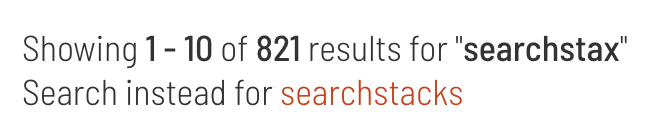
You may need to search for the specific ‘spelling correction’ string (e.g. ‘search instead for searchstacks’) to ensure you’re properly identifying spelling corrections.
Analytics
Testing site search analytics will likely require customized testing for your specific tracking implementation but shouldn’t be too difficult when using browser-based testing.
					# Using 'searchInput' found in the example above
...

searchInput.clear()
searchInput.send_keys('search')
searchInput.submit()

networkLogs = driver.get_log("performance")
for log in networkLogs:
request = json.loads(log['message'])
if request['message']['method'] == 'Network.responseReceived':
	if 'google-analytics' in request['message']['params']['response']['url']:
		# Test Google Analytics
The code above submits a basic search and checks for Google Analytics network requests. Additional analytics testing can include checking for analytics API calls for clicks on result page, interactions with facets or filters, and clicks on related search suggestions.
Testing Search Relevancy and Quality
The subjective standards of search ‘relevancy’ or ‘quality’ make it difficult to test programmatically – especially if you can’t look back at user interactions for a specific search term or feature. Many existing metrics for ‘search quality’ focus on the behavioral patterns of users that have actually interacted with your live search experience and may need a significant volume of data to confidently calculate search quality metrics.
If the content on your site doesn’t change often and you don’t expect your search ranking algorithms to fluctuate you can manually test search page quality or relevance against a fixed set of ‘known-good’ results using basic pass/fail tests. These tests, however, can be tedious to create and difficult to manage when your site content or search result behavior changes frequently.
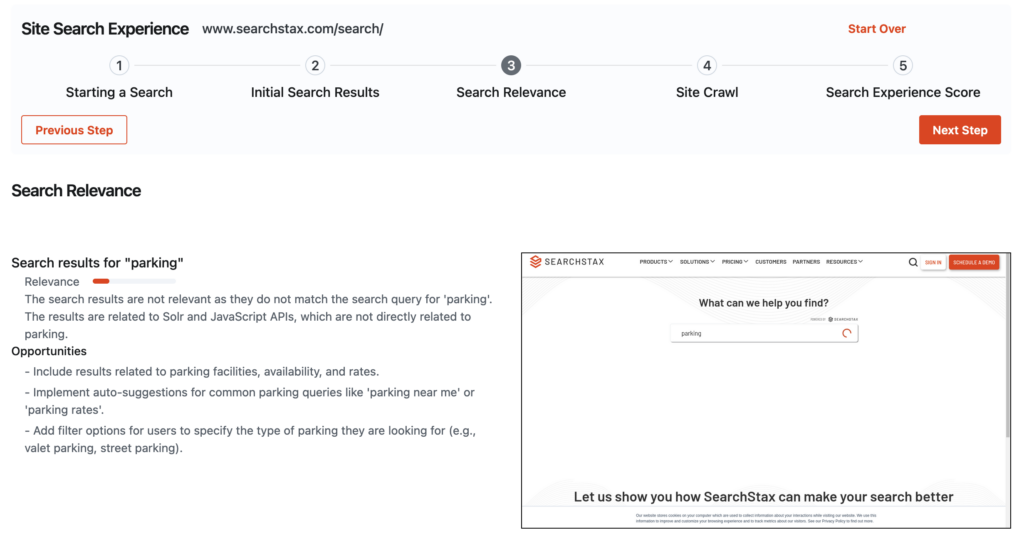
Using Large Language Models (LLM) to test search relevancy and quality
While not perfect – large language models offer a flexible testing option to programmatically check for search relevancy and quality. Effective prompt creation can include intended audience/use case for testing as well as desired output such as estimated relevancy score or suggested improvements to your search page.
					# See Selenium initialization code above
...
import openai

bodyContent = driver.find_element(By.XPATH, "/html/body").text

client = openai.OpenAI(api_key = 'OPENAI_KEY')
stream = client.chat.completions.create(
model="gpt-3.5-turbo",
messages=[
{
    "role": "system",
    "content": "Test the relevancy of this search result page for new customers"
},
{
    "role": "user",
    "content": bodyContent
},
       ],
response_format={ "type": "json_object" },
)
searchQuality = stream.choices[0].message
LLMs provide a ‘good-enough’ programmatic test that can follow content changes or search algorithm updates without on-going updates or management. LLM testing, however, is only as good as the underlying testing infrastructure and well thought-out prompts so they are not a complete replacement to human-powered testing and QA. Depending on your LLM platform you may incur additional costs when testing a large number of search pages frequently.
Crawling & Ingesting Content
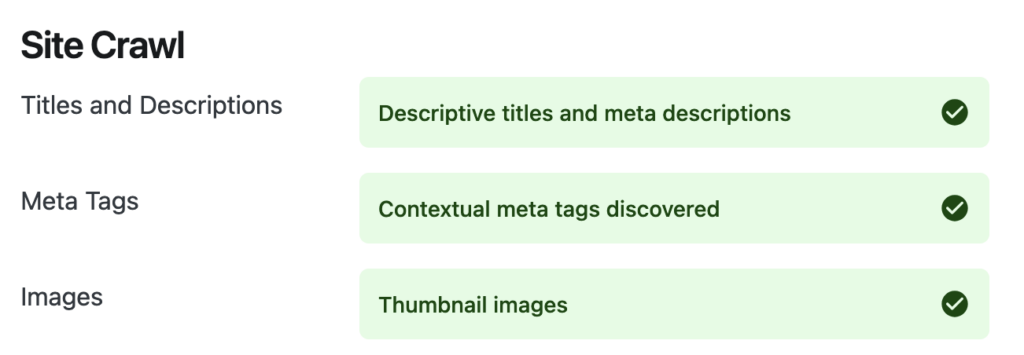
Site crawls are not as commonly used in deployment testing or QA – but can be used to identify issues relating to meta data changes, page template updates, on-page content changes, or other site updates such as URL redirects. These changes can impact your site search experience when meta data changes or goes missing, pages get redirected or removed, or major changes to on-page content or tagging doesn’t get indexed in your site search.
					import scrapy
from scrapy.utils.project import get_project_settings
from scrapy.crawler import CrawlerRunner

class crawler(scrapy.Spider):
	def __init__(self, crawlID):
    		self.start_urls = ['https://site-dev.searchstax.com']

	def parse(self, response):
    		title = response.css("title::text").get()
    		description = response.xpath('//meta[@name="description"]/@content').get()
    		# QA title/meta tags

settings = get_project_settings()
runner = CrawlerRunner(settings)
runner.crawl(crawler)
This basic code sets up a custom scrapy ‘crawler’ with a parse function that gets the page title and description. This can be extended to check for other tags and ensure that they’re set or configured correctly.
Other Search Experience Signals
The methods outlined above focus on repeatable programmatic testing that could be tied to your production deploy process or included in regularly scheduled QA processes. These tests cover a lot of the search experience and search page features but additional analysis of user search trends are another critical part of search experience testing.
Here are some other helpful resources for measuring, improving, and optimizing your site search experience.
- UX Best Practices for Site Search
- Customer Journey Map Guide: Your Mapping is Missing One Key Element
- How to Improve Your Website Click-Through Rate
- Site Search Data Unveiled: 7 Key Insights into Your Website Visitors’ Behavior
- Search Analytics: How SearchStax Site Search Gives You More Insights than Google Analytics
When to test your Search Experience
Testing and QA can add time and complication to your web development process up front – but well-written tests and effective QA can save hours of time debugging and fixing production issues while sparing your end-users the headaches of using incomplete or broken features.
It’s up to your organization and technical teams to determine how rigorous your testing procedures will be and some tests can be run as needed.
- Consider using a testing suite in your front end development and deploy process to catch ‘easy’ bugs before they get committed to your repos
- Schedule recurring QA passes for general quality assurance, regression testing, and deeper testing for major feature releases and updates
- Regular ‘human’ testing within your org to ensure actual site visitors can use and interact with your site
- Review site usage and search analytics data to uncover anomalies, no-click searches, and other signals that might indicate falling search quality or relevance
- Conduct user research with existing customers and potential users to ensure site features and search configuration align with user expectations
Testing with SearchStax
Developers, IT teams, marketers, and UI designers will need to collaborate and agree on the types and depth of testing they want to include as part of their site search experience. Missing tests or ineffective testing can miss critical bugs or errors leading to user dissatisfaction and disengagement from your site.
SearchStax Site Search includes prebuilt Search UI Kits that make front end development quicker and simpler so your teams can deliver high quality search front ends faster. Our Search UI Kits are compatible with most testing suites for your framework of choice and can also be tested programmatically with browser-based tests.
Site Search also included detailed search analytics to track, measure, and improve search quality and relevancy for your users.
Get Our Newsletter
The Stack is delivered bi-monthly with industry trends, insights, products and more

Kevin Montgomery Lorem ipsum dolor sit amet consectetur. Turpis mattis aliquam cursus commodo sit. Placerat est sem tortor donec. Quis tristique nunc tincidunt diam eget ac. Est ut pretium id duis gravida dolor enim. Risus fames quis volutpat semper donec aug zzzzue. Volutpat tincidunt auctor sed sit. Nunc rhoncus netus facilisis.